


ARI (Auto Repair Software)
4.3332.00 Reviews
App Specs
- Version
- 16322.0.0
- Updated On
- License
- Free
- Downloads
- 100,000+
- Developer
- uMob LTD
- Categories
- Auto & Vehicles
- Platform
- Android
Screenshots

 Analysis by AppCompare
When an auto repair shop gets busy, even small gaps in the handoff can cause delays: a job’s status is unclear, a customer needs an update, or an invoice is waiting to be finished. I’d look at ARI (Auto Repair Software) as a way to bring those everyday tasks into one working routine, rather than as a replacement for a mechanic’s judgment. It is a free Auto & Vehicles app from uMob LTD, with optional in-app purchases ranging from $3.99 to $399.99 per item. Its 4.3 average from around 1.3K ratings and more than 100K installs suggest that it has found an audience, though those figures alone can’t tell you whether it fits your shop.
Getting Started with ARI
First things first, setting up ARI is a breeze. Downloading the app is straightforward, and it’s available for both Android and iOS, which is a big win in my book. Once you have it on your device, you’re greeted with a clean and intuitive interface. I didn’t have to spend hours figuring out where everything was. The app guides you through the setup process with helpful prompts, making the initial configuration simple even for the less tech-savvy among us.
Where Setup and Daily Use Can Get Tricky
A simple first screen is useful, but a shop-management app only earns its place once the team has agreed how to use it. Before entering live work, I’d decide who creates a repair record, who updates its status, and who checks that customer and vehicle details are complete. If each person uses a different naming habit or leaves notes in different places, the app can hold information without making it easy to act on.
For a clean start, I’d set up a small, representative job first: record the problem as the customer describes it, add the workshop’s findings, and note what still needs attention. Then check that another person can understand the record without asking the original writer to explain it. This is a practical test of the workflow, not just the interface. Consistent notes are especially important when a vehicle returns or a job changes hands mid-shift.
It’s also worth separating an initial diagnosis from work that has been approved. A tidy record should make clear what the shop has observed, what it plans to do, and what remains undecided. That distinction helps prevent a quick note from being mistaken for authorization or a completed repair. ARI can help organize records, but the team still needs a shared habit for writing them clearly.
Features That Stand Out
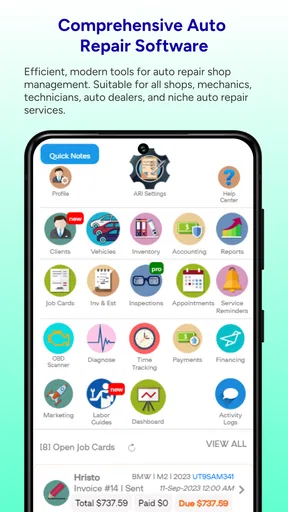
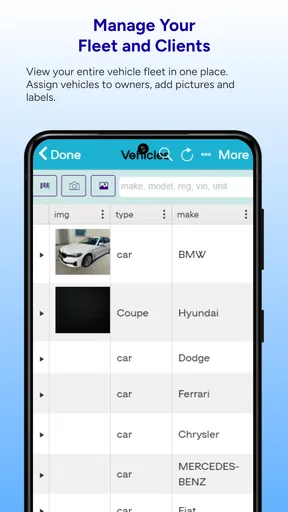
Now, let’s talk features. One of the big selling points of ARI is its comprehensive suite of tools designed to manage your entire repair business. From tracking repairs and managing inventory to handling invoices and customer communication, ARI covers it all.
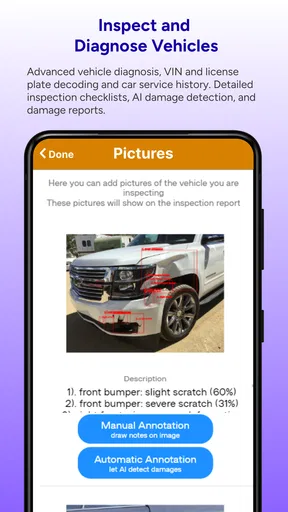
- Repair Tracking: You can easily log repairs with just a few taps. The app lets you attach photos, add notes, and even track the status of each job. This feature alone can save a ton of time and keep your team on the same page.
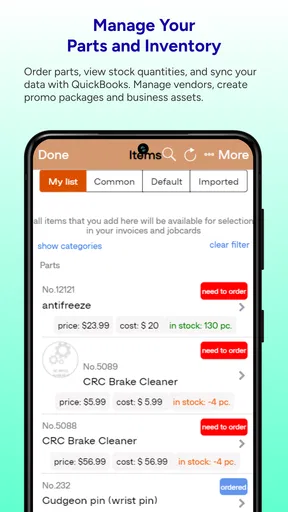
- Inventory Management: Keeping track of parts is no longer a headache. ARI allows you to monitor stock levels, reorder parts, and manage suppliers all within the app.
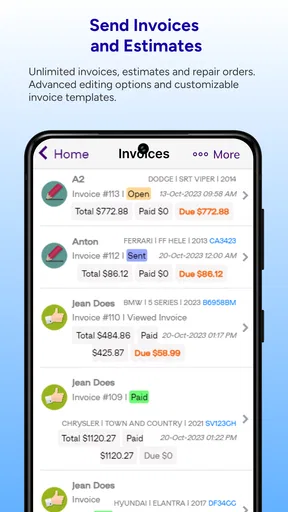
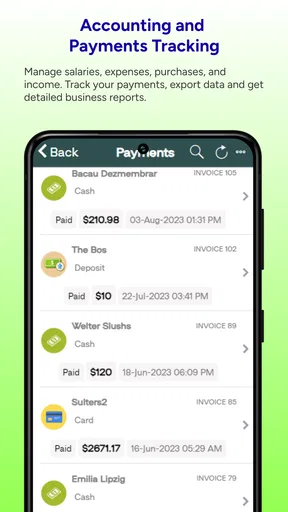
- Invoicing: Creating and sending invoices is seamless. You can customize templates, add your logo, and send invoices directly to customers via email. Plus, payment tracking is built-in, so you’ll always know who owes what.
- Customer Communication: ARI makes it easy to keep in touch with your customers. Whether you’re sending appointment reminders or following up on completed repairs, the app’s communication tools are top-notch.
Make the Workflow Useful, Not Just Complete
The less obvious value of having job notes, photos, parts, and billing in the same routine is the handoff. If a technician records what they found and the person handling customers later reviews that same job, there is less dependence on a verbal update that can be forgotten during a rush. I’d use photos selectively: capture a detail that helps explain a finding or document the state of a repair, rather than attaching images without a clear purpose. A useful record is one that answers the next person’s question quickly.
Worth Reading Before You Choose

EA SPORTS FC Mobile 26 Is a Bigger Football Game, but It Takes Time

Flipboard Shows What News Apps Must Do Beyond the Feed

Switching to Android Auto Means Rethinking Your Driving Routine

Google Calendar Makes a Crowded Week Easier to Manage

Ludo King Makes the Most of the Minutes Between Plans

Baby Panda World Brings Quick Play to Modern Phones, but Its Game Library Feels Busy
Inventory records work best when they’re treated as a prompt for checking stock, not as proof that a part is physically on the shelf. If a part is reserved for a job, or a delivery is delayed, the shop should make that distinction clear in its own process. This is a trade-off common to digital stock tracking: it can make shortages easier to spot, but only if updates keep pace with what is actually happening in the workshop.
For invoicing, I’d review the customer details and the work recorded before sending anything. A saved template can make routine billing quicker, but it won’t catch a mistaken description or an overlooked line. That quick review is particularly useful when a repair has changed scope since the initial estimate. The app can organize the paperwork; the shop remains responsible for making it accurate and understandable.
User Experience
Using ARI daily, I found the app to be incredibly responsive. It never lagged or crashed, which is crucial when you’re dealing with the fast-paced environment of an auto repair shop. The design is intuitive, and everything is just where you’d expect it to be. The developers clearly put a lot of thought into how mechanics and shop owners work.
Another thing I loved is the customization options. You can tailor the app’s settings to fit the specific needs of your business, which ensures that you’re not bogged down by unnecessary features. It’s like having a tool that adapts to you, instead of the other way around.
A Busy-Day Example, and How It Compares
Picture a customer dropping off a car while the shop is already handling several jobs. One person records the complaint and the initial inspection, a technician adds a photo and a note after checking the vehicle, and the person at the front desk uses the same job record to prepare an invoice once the work is finished. That kind of sequence is where ARI’s combination of repair tracking, customer communication, inventory, and billing can be more useful than keeping each task in a separate notebook, spreadsheet, or messaging thread.
That does not mean a dedicated accounting package or a simple spreadsheet is always the wrong choice. A spreadsheet may suit a very small operation that only needs a short list of active jobs and is comfortable handling billing elsewhere. Dedicated accounting software may be a better fit when financial reporting is the main concern. ARI makes more sense when the daily friction is the connection between repair work and shop administration. I would compare the app against the actual steps your team repeats, rather than choose it just because it presents many tools together.
It may also be too much for an individual who repairs vehicles casually and has no need to track customer communication, parts, or invoices. On the other hand, a small shop with several people sharing jobs may benefit from having a common record, provided everyone is willing to keep it current. For a larger operation with specialized approval processes or established systems, I’d first check whether ARI’s workflow matches the way the business already assigns and reviews work.
Recovering When a Workflow Goes Off Track
If a job seems incomplete, I’d first check the record itself: confirm that the correct customer and repair are open, look for a saved status or note, and ask the person who handled the work to clarify anything ambiguous. If an invoice does not look ready, compare it with the repair notes before sending it. These are simple checks, but they can prevent a missing update from turning into a confusing customer conversation.
When something appears not to save or display as expected, I’d avoid immediately entering the same job again. First check whether the original record is still present, then reopen the relevant area and confirm the details. Creating duplicates can make later tracking and billing harder. If the issue persists, use the app’s available support route rather than guessing at a technical cause; the right next step depends on what the app is doing on that device.
Not every delay is caused by the software. A supplier may not have delivered a part, a customer may still be deciding on additional work, or the diagnosis may need another check. In those cases, updating the job record with a clear status and the next action is more helpful than repeatedly refreshing the screen. ARI can keep the paperwork organized, but it cannot make a parts delivery arrive or settle a decision for the customer.
Is ARI Worth It?
Let’s cut to the chase—is ARI worth your time and investment? In my experience, absolutely. Its comprehensive feature set and user-friendly interface make it a valuable asset for any auto repair shop. Whether you’re a small family-run business or a larger operation, ARI scales beautifully to meet your needs.
Moreover, the app receives regular updates, ensuring that it stays current with the latest industry practices and technology. It’s clear that the developers are committed to maintaining and improving ARI, which is always a reassuring sign.
ARI is free to install and is rated for Everyone. It was released on December 21, 2016, and its current version is 15821.0.0, with Android 6.0 as the minimum operating-system requirement. I’d keep the in-app purchase range in mind before building a budget around it: the app’s free entry point does not mean every paid option will suit every shop. Before relying on it for a whole business, I’d check the current purchase choices and decide which, if any, are relevant to the way you work.
In conclusion, if you’re in the market for a robust, efficient, and easy-to-use auto repair management tool, ARI should definitely be on your radar. It’s a game-changer that can transform how you run your business, making it more organized and less stressful.
My recommendation is strongest for a repair shop that wants repair records, customer updates, stock handling, and invoicing to support one another, and is prepared to keep those records accurate. I’d skip it if you only need basic bookkeeping, prefer to run jobs entirely on paper, or need a workflow that the app cannot accommodate. The best test is to try a typical repair from intake through billing and see whether the shared record saves your team effort without adding new chores. If it does, ARI can be a practical part of the shop’s day; if not, a simpler or more specialized tool may be a better fit.
Pros
- User-friendly interface for easy navigation.
- Comprehensive repair database included.
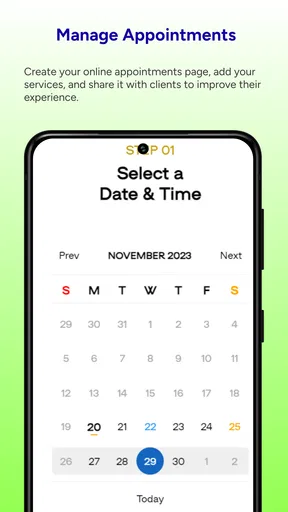
- Seamless scheduling and reminders.
- Integration with major parts suppliers.
- Supports multiple user access.
Cons
- Limited offline functionality.
- Initial setup can be time-consuming.
- Requires regular updates.
- May overwhelm small shops with features.
- Customer support response time varies.
FAQs for ARI (Auto Repair Software)
What features does ARI (Auto Repair Software) offer?
ARI provides a comprehensive set of tools designed for auto repair shops, including appointment scheduling, invoicing, inventory management, and customer relationship management (CRM). It also offers diagnostic tools, a parts database, and integration with third-party software. The app is user-friendly, making it suitable for both small and large repair businesses.
Is ARI compatible with both Android and iOS devices?
Yes, ARI is available for both Android and iOS platforms. The app is optimized for smartphones and tablets, ensuring that users have a seamless experience regardless of the device they use. Regular updates ensure compatibility with the latest operating systems and devices.
How secure is the data stored in ARI?
ARI prioritizes data security by using encryption protocols to protect sensitive information. The app requires secure logins and provides options for backing up data to the cloud. Users can be confident that customer and business information is safeguarded against unauthorized access.
What kind of support and resources are available for ARI users?
ARI offers robust customer support through various channels, including email, phone, and live chat. Users also have access to a comprehensive knowledge base, tutorials, and user guides. The community forum allows users to share tips and troubleshoot common issues collaboratively.
Are there any subscription fees or in-app purchases with ARI?
ARI operates on a subscription model with different pricing tiers to cater to various business sizes and needs. While the basic features come with the standard subscription, additional premium features may require in-app purchases. Users can choose a plan that best fits their budget and service requirements.


